Open sourceOne Worker, one D1, one R2

Stored with care, shipped everywhere

Pakhuis is a headless PIM and CMS that runs as a single Cloudflare Worker: content types in TypeScript, an admin your editors will enjoy, delivery APIs, and an MCP server so AI assistants can work on your catalog too.

Deploy to Cloudflare
npm create @pakhuis my-site

Or build with an agent

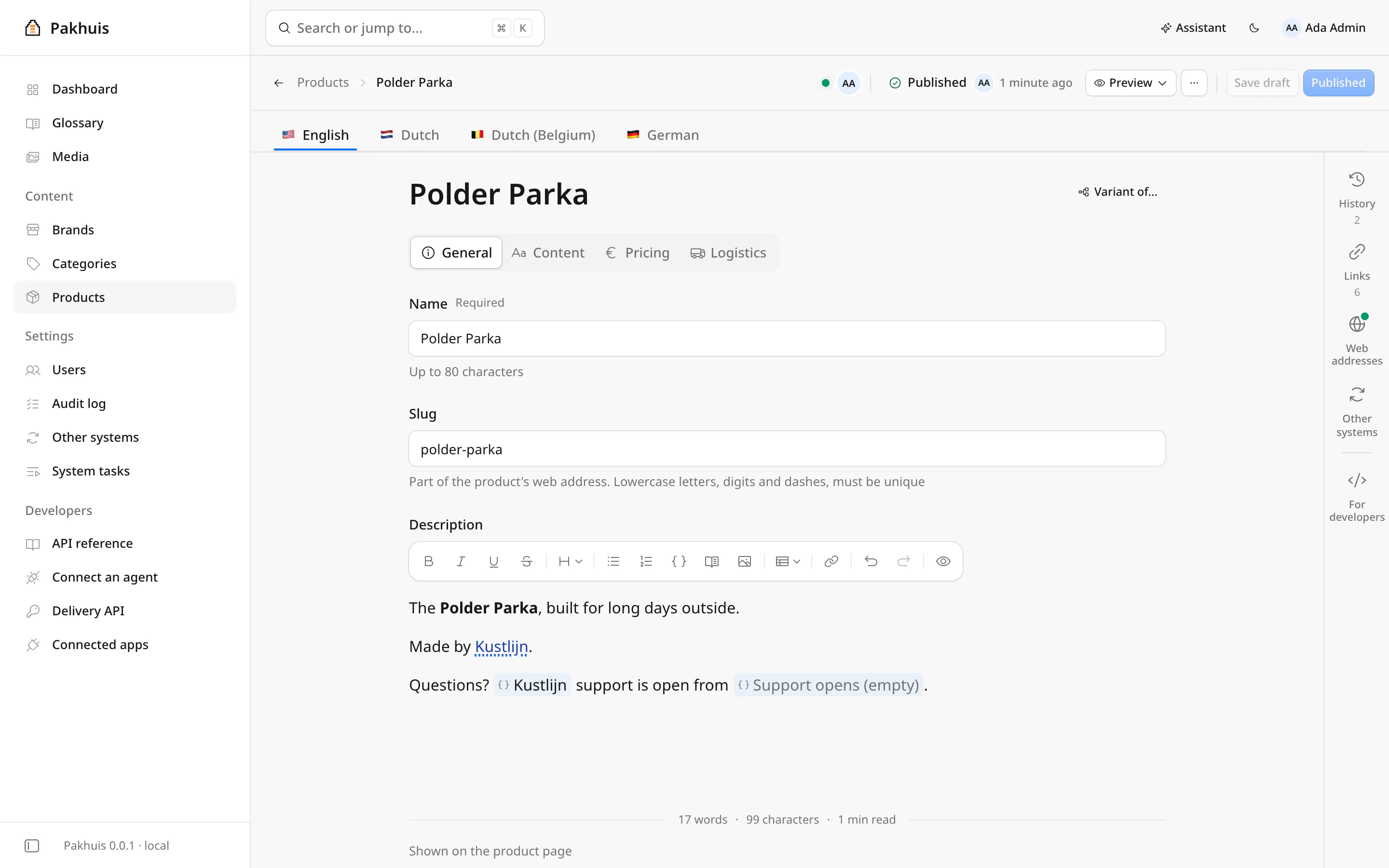
The Pakhuis admin editing the Polder Parka product: tabs for English, Dutch, Dutch (Belgium) and German, field groups, and a rich text description with links to other objects.

Capabilities

Everything your catalog needs

Products, pages, translations and images come in once. Pakhuis keeps them orderly, versioned and in every language, and sends them to your website, shop, search index and AI assistant.

Your model lives in code

Content types, fields, languages and roles are TypeScript in pakhuis.config.ts, reviewed in pull requests and deployed like the rest of your app. The database follows along on its own: promoted fields get real, indexed columns and additive changes migrate on start. Drops and type changes are reported, never applied behind your back.

pakhuis.config.ts
defineType({  name: "product",  inherits: "parent",  fields: {    name: f.text(),    price: f.number({ indexed: true }),    images: asset()  }})
01 ModelTypes in TypeScript
MigrationsOn start
+product.priceREAL, indexed
+product.imagesrelation
!product.eandrop reported

Additive changes applied. 1 change needs you.

02 MigrateThe database follows
Products/Polder ParkaDraft
EnglishDutchGerman
Polder Parka
229.00
Publish
03 EditForms made from your types
GET/api/delivery/objects/…
{  "type": "product",  "locale": "de",  "values": {    "name": "Polder-Parka",    "price": 229  }}
04 DeliverIn every language

Made for editors, not just developers

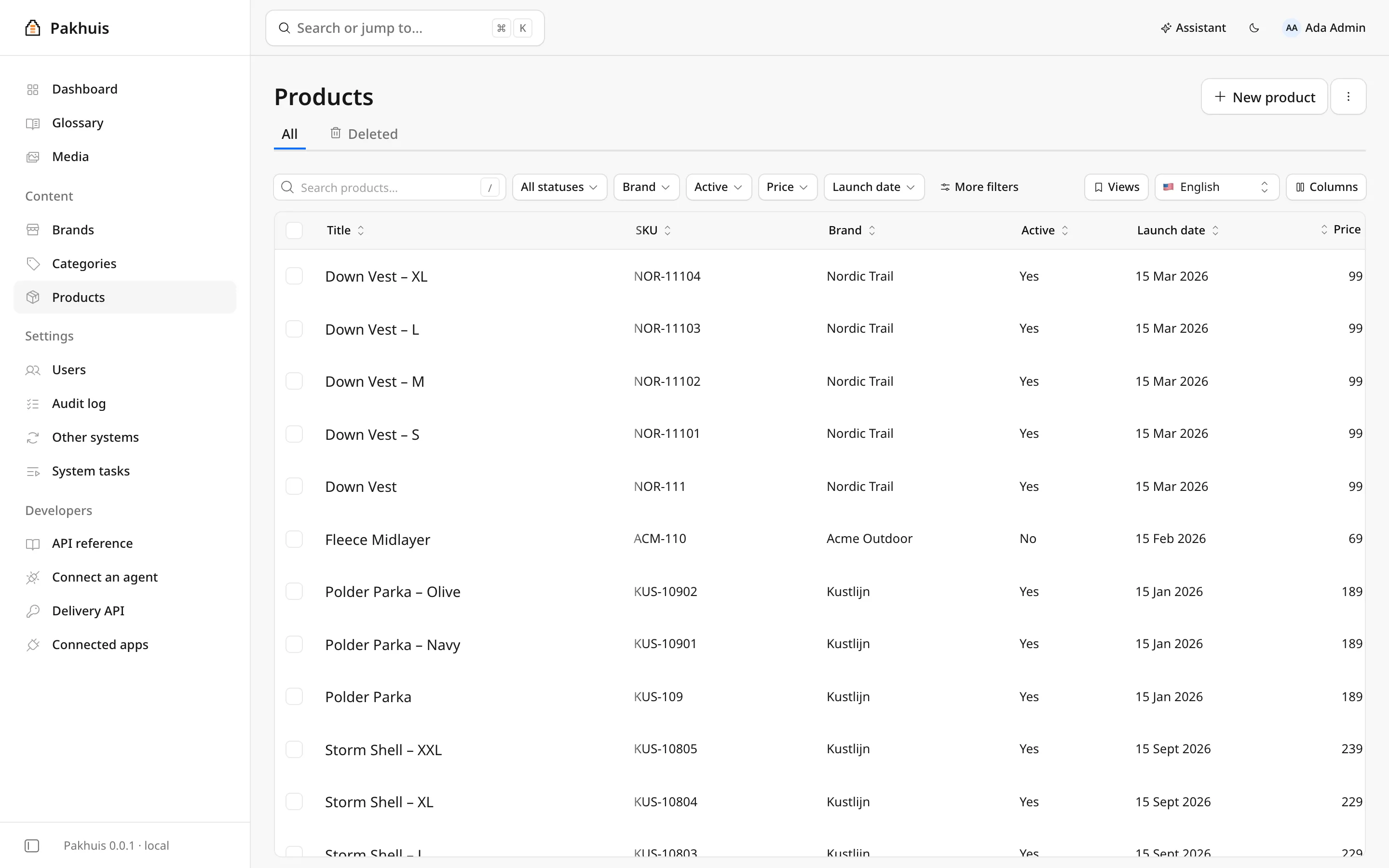
A fast admin in plain words. Grids with filters, sorting, columns and saved views per type; bulk publish and delete with per-item results; CSV import and export; duplicate an entry or add a variant of it. Jump anywhere with ⌘K, and sign in with a passkey instead of a password.

The products grid in the Pakhuis admin, with filters for status, brand, price and launch date, and columns for SKU, active and price.

Drafts, history and scheduling

Edits are drafts until you publish. Schedule a publish or take an entry offline at a set time. Every save is a version: compare any two field by field and restore with one click. You see who else has an entry open, and saves are checked against the revision you started from.

  1. 3 Nov, 09:00Scheduled
  2. YesterdayPublished
  3. Just nowDraft saved
Version 14 and 15AS
Price249 229
DescriptionBuilt for long days outoutside.
Images2 added
Saved by SemRestore

Every language, field by field

Fallback chains like nl-BE → nl → en, resolved per field: a Belgian variant stores only what differs from Dutch. A glossary of approved wording is marked in the editor and checked on every AI save, and AI translates one field or a whole entry while respecting it.

nl-BEnlen
Polder Parka/Dutch (Belgium)
NamePolderparkanl
DeliveryGratis levering in Belgiënl-BE
CareWash at 30°Cen

Waterdichte regenjas met capuchon

Glossary: regenparkaFix

Look after your media

A media library with folders, duplicate detection, alt text per language and focal points. Image presets are rendered on request in AVIF and WebP with srcset widths and watermarks, and cached; on Workers Cloudflare Images makes them. Files up to 5 GiB go straight from the browser to storage.

Media/Outerwear24 files
Duplicate
card800 × 600, coverAVIFWebP
hero400 to 2400 widesrcset

Deliver everywhere

A delivery API for your frontend: filter, sort and page any type in any language, with read keys and a rate limit, and REST docs at /api/docs. Each type declares a type-checked URL builder; URLs are kept per language and rebuilt when anything they depend on changes, so you can route your site by URL. Multiple sites, each with its own languages and sitemap. Sync to Meilisearch, or anywhere through signed webhooks.

GET/api/delivery/by-url
shop.be/nl-be/jassen/polderparka
200product, nl-BE, site shop-be
fr-BEshop.be/fr-be/vestes/parka-polder
  • Website
  • Meilisearch
  • Webhooks
  • Sitemaps

Built with agents in mind

Every project is an MCP server with tools to search, read, draft, publish, upload and find usages. Claude, ChatGPT and other clients connect with OAuth and act as the person who approved them, with the same permissions; you see and revoke connections in the admin. In the editor, an assistant fills in, rewrites, describes images, checks and translates, and a chat makes changes for you to review.

  • claude.ai
  • ChatGPT
  • Claude Code
  • Cursor
  • Any MCP client
ChatGPTConnected as Ada, editor

Translate the new outerwear into German and leave it as drafts.

3 tool calls

Find the productssearch_objects
Check the glossaryget_object
Save German draftscreate_or_update_draft
✓
6 German drafts savedNothing published, ready for review

Stay in control

Roles and permissions on types and asset folders. Lists are filtered in the database, so people only ever see what they may. Passkey sign-in with one-time invites; sign-in is a plugin, so you can bring your own. Background jobs run exactly when the change that asked for them commits, with retries and a screen to retry failures.

Permissions per role
RoleReadWritePublishDelete
adminYesYesYesYes
editorYesYesYesNo
websiteYesNoNoNo
meilisearch.sync142 done
webhooks.deliver1 failed Retry

Small to run

One Worker, one D1 database, one R2 bucket. No PHP stack, no Elasticsearch cluster, no servers to patch: deploy with a button and pay for what you use. Locally it’s Bun and a SQLite file, and the same config runs on both.

pakhuis

  • Admin
  • API
  • MCP
  • OAuth
  • D1Data
  • R2Files
  • QueueJobs
  • CronSchedules

Small core, everything else a plugin

Assets, AI, search, webhooks and even sign-in are plugins, and yours can do anything they do: add tables, routes, background jobs, MCP tools, field kinds and admin screens, with definePlugin anddefineAdminPlugin for its admin part.

my-site/pakhuis.config.ts
1export default defineConfig({2  locales: { default: "en", locales: ["en", "nl", "nl-BE"] },3  types: [Product, Category, Brand],4  plugins: [5    McpPlugin(), OAuthPlugin(),6    AssetsPlugin({ presets: { card: { width: 800 } } }),7    GlossaryPlugin(), WebhooksPlugin(), CsvPlugin()8  ]9})
assets
Media library, image presets, large direct uploads
ai
Editor assistant and chat
mcp
MCP server, with tools from every plugin
oauth
Lets claude.ai, ChatGPT and other MCP clients connect as a person
passkeys
Passwordless sign-in, invites and the first-account setup code
glossary
Approved translations of terms
csv
Import and export of any type
webhooks
Signed events on publish, save and delete
meilisearch
Keeps a Meilisearch index in sync
sitemap
XML sitemaps per site
views
Saved layouts of content lists, your own or shared
presence, avatars
Who else is editing, and people’s pictures

Coming from Pimcore or Akeneo? See what Pakhuis covers of Pimcore andof Akeneo.

Get started

A project is three files

pakhuis.config.ts for types, plugins, languages and roles, a one-line worker.ts, andwrangler.jsonc. The starter’s README covers settings and updates.

  1. 1

    Create a project

    Everything lives in .pakhuis/ while you develop, with one-click test people on the sign-in page.

    # admin and API on localhost:4000
    npm create @pakhuis my-site
    cd my-site && bun install
    bun run dev
  2. 2

    Describe your content

    Add types and plugins to the config. The database and the admin follow on the next start.

    import { cloudflare } from "@pakhuis/server/cloudflare"
    import config from "./pakhuis.config.ts"
    
    export default cloudflare(config)
  3. 3

    Deploy

    The first deploy creates D1, R2 and the queue. Two secrets: one encrypts stored connector secrets, one lets the first person create the admin account.

    bunx wrangler login
    bun run deploy
    bunx wrangler secret put PAKHUIS_SECRET_KEY
    bunx wrangler secret put PAKHUIS_SETUP_CODE

Frequently asked questions

What is Pakhuis?

A headless PIM and CMS: one place for your product and content data, with an admin for editors and APIs for your website, shop, search and AI tools. It runs as a single Cloudflare Worker, or on Bun with a SQLite file.

What’s in the name?

A pakhuis (say “PAHK-house”) is Dutch for a warehouse, literally a pack house. Along the canals of Amsterdam they stand tall and narrow, with a hoisting beam under the roof. Goods came in by boat, were checked, sorted and stored on the floors, and went back out to wherever they were needed. Pakhuis does the same with your data.

How is it different from Pimcore or Akeneo?

There’s no PHP stack or Elasticsearch cluster to run, and your model is TypeScript in your repository instead of settings in a database. See what Pakhuis covers of Pimcore andof Akeneo.

Do I need Cloudflare?

No. The same config runs on Bun: plugins pick their backend from the runtime, so assets live in R2 on Workers and on disk or S3 on Bun. On Workers you get D1, R2, a queue for background jobs and a cron for schedules.

Do I need to use AI?

No. The assistant and the MCP server are plugins: leave them out of your config and Pakhuis works the same without them.

What’s next?

Calculated fields across objects, caching, OIDC sign-in, variant axes, and a migration path from Pimcore.

Where can I ask questions?

Open an issue or a discussion on GitHub.